Wednesday, November 5, 2008

Thursday, June 28, 2007
An effective finger-based keyboard for the iPhone
From MobiCommIT, June 27, 2007 post -
Found this at Take a Bite -
It would[n't] be fair to just say that the iPhone is unsuited for use while driving due to the lack of a keypad without mentioning why it'll be quite comparable to typing on a physical keyboard for sighted people.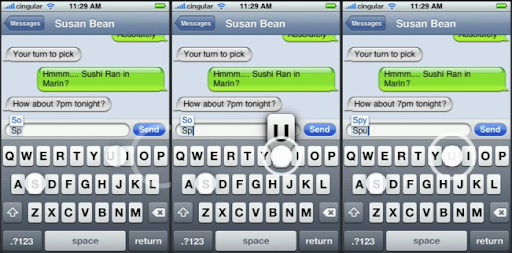
From left to right:
The visual feedback you get from letter magnification combined with 'on release' behavior instead of 'on click' behavior suggest that typing will be a breeze on the iPhone. Multi-touch, or the ability to touch different parts of the display at the same time, means fast two (or more) fingered typing.
----------
I guess the operative word is "sighted" as most teenaged mobile phone users I know these days (except perhaps the ones in the USA) compose SMS text messages without sight - meaning they touch type on the phone's keypad. The phone can very well be in their pocket or their bag. They can even be talking to you, looking at you straight in the eye while their fingers are busy clicking away.
I just don't see how the QWERTY keyboard, on top of the touch feedback, will allow them to replicate the texting experience on the iPhone
SMS the iPhone Way
Originally posted at MobileCommIT June 27, 2007 -
With the iPhone getting well over 69 million hits in Google, it is surprising that there is very little discussion on how it deals with SMS texting. Surprising because the iPhone is well a mobile phone. It also does not have a physical keypad. And just as importantly, it processes and presents messages that can be considered a radical departure from the familiar sequential listings in the Inbox, Sent, Log screens established by Nokia.
The iPhone designers are obviously aware that many users often go into texting conversations on the phone, kinda similar to IM chats. So they decided to organize these texting conversations into speech bubbles that can be scrolled back for reference instead of the usual separate Inbox and Sent listings. In addition, mutiple text chats can be stored (by contact name) so that you resume a chain.
This UI will definitely help avid PC IM users transition into text chat on the phone, rather on the iPhone. The question though is just how good is the QWERTY virtual keyboard? I haven't had the chance to do a hands-on but I doubt very much if it can provide a tactile feedback that is often required by users. Personally I feel the keyboard issue will either make or break the iPhone as a mobile phone.


